
A strategic briefing for Chief Financial Officers
Workflow automation can return real cash, but usually more slowly than the business case assumes. This briefing sets out a five-step framework, the correct formulas for return on investment (ROI) and payback, benchmarks that trace back to their publishers, and a worked model with every input stated.
One-sentence takeaway: Plan the payback in years, not months, because most executives in Deloitte’s 2025 survey reported reaching satisfactory ROI on a typical AI use case within two to four years.1
1. Why ROI Matters to the Finance Office
1.1 Capital discipline under digital pressure
- Expectations run ahead of results. Deloitte surveyed 1,854 executives in Europe and the Middle East. Technology investments are typically expected to pay back in seven to 12 months, yet only 6% of respondents reported payback on AI in under a year.1
- An hour costs more than its wage. According to the US Bureau of Labor Statistics (BLS), manufacturing employers paid $48.62 per hour worked in total compensation in June 2026, of which $32.50 was wages and salaries.2 Each wage dollar carries about $1.50 of cost (48.62 ÷ 32.50 = 1.496), before desk space, software seats and supervision.
- Automation competes for the same capital. It must clear the hurdle rate, the minimum return the company requires of any investment, like a new machine or a new hire.
1.2 Value drivers unique to workflow automation
- Hard savings: labor hours, error rework, paper and storage, early-payment discounts.
- Revenue lift: faster sales cycles and more capacity. In a study of 5,172 customer support agents, an AI assistant raised issues resolved per hour by 15% on average. Less experienced workers improved in speed and quality, while the most experienced saw small speed gains and small quality declines.3
- Risk and compliance: fewer penalties, lower audit costs, less exposure to fraud.
- Soft gains: staff retention, customer satisfaction, better visibility of data (see section 6).
Freed hours become cash only when they remove a cost you are paying now, such as overtime, a temp, a contractor’s invoice or a planned hire. Otherwise they are capacity, and they belong with the soft gains. Which cost you can actually stop paying, and how much of it there is, usually matters more than how much work the tool removes.
2. Financial Framework for “True ROI”
2.1 Five-step model
| Step | CFO Action | Typical Data Sources |
|---|---|---|
| 1 | Map the baseline process: volume, hours per case, rework | Two-week time study; 12 months of ERP or inbox volume |
| 2 | Identify the cost the change removes, and its size | Supplier and contractor invoices, overtime records, loaded hourly cost |
| 3 | Calculate total investment, one-time and recurring | Licenses, usage fees, integration, data cleanup, training, monitoring |
| 4 | Model benefits month by month | Build, ramp-up and steady state; best, base and worst cases |
| 5 | Apply risk-adjusted metrics | Payback month, NPV at WACC, IRR, sensitivity tests |
The ERP is the core business system; loaded hourly cost is the wage plus the employer’s benefit costs. An SLA (service-level agreement) sets penalties for missed deadlines, and DSO (days sales outstanding) is how long customers take to pay.
NPV (net present value) is the sum of future cash flows discounted to today’s money. The usual discount rate is the WACC (weighted average cost of capital), the blended rate paid to lenders and shareholders. IRR (internal rate of return) is the discount rate at which NPV is zero.
2.2 Core equations
Net benefit (month n) = cost removed + incremental contribution from new revenue − running costs
Cumulative cash position (month n) = net benefits to date − one-time costs paid to date
ROI = (total benefits − total costs) ÷ total costs, over one stated horizon
Payback month = the first month in which the cumulative cash position is zero or above
Incremental contribution is what the extra sales leave after the cost of making them. Added revenue is not a benefit on its own: $100,000 of extra sales that cost $85,000 in parts, labor and freight contribute $15,000, and that is the figure the model carries.
Benefit ÷ cost is a ratio, not ROI: it counts the money spent as if it were a return. The earlier version of this page made that error, dividing $170,000 of first-year benefit by $60,000 of cost and printing 283% as the ROI. The ROI on those figures was ($170,000 − $60,000) ÷ $60,000 = 183%.
Three more rules apply. A saving can never exceed the cost it removes, which is a real ceiling and not a formality: if the only invoice you can cancel is worth $4,550 a month, no automation rate turns it into more. Benefits and costs must cover the same horizon. And investment ÷ average monthly benefit is not payback: it skips the build and ramp-up months, so it usually shows payback too early. All of these measures are undiscounted; for horizons beyond a year, discount the monthly cash flows at your WACC to get NPV.
3. Benchmarks That Hold Up
Vendor case studies make poor benchmarks: they seldom state the baseline, the horizon or the costs counted. A separate article traces the figures in one badly sourced earlier draft back to their claimed origins and shows the typical ways such figures fail. The figures below come from surveys, statistics and research that trace to their publishers, and each tests one input of your model.
| Benchmark | Measured figure | What it tests | Source |
|---|---|---|---|
| Payback on AI | Most of 1,854 executives reported satisfactory ROI on a typical AI use case within two to four years; 6% saw payback in under a year | Your payback month | Deloitte, 20251 |
| Accounts payable (AP) | $9.84 average cost per invoice, 8.2 days to process, an 18.4% exception rate; best-in-class teams (the top 20%) have a 79% lower cost per invoice | Your cost per invoice | Ardent Partners, State of ePayables 20254 |
| AI-assisted productivity | 15% more issues resolved per hour on average, across 5,172 support agents | Productivity claims | Brynjolfsson, Li and Raymond, 20243 |
| Human error | Base error rates usually 1% to 5% for simple but nontrivial actions such as writing and calculating | Error savings | Panko, 20155 |
| Loaded labor cost | Manufacturing, June 2026: $48.62 total compensation and $32.50 wages per hour worked, a ratio of 1.496 | Your loaded hourly cost | BLS, 20262 |
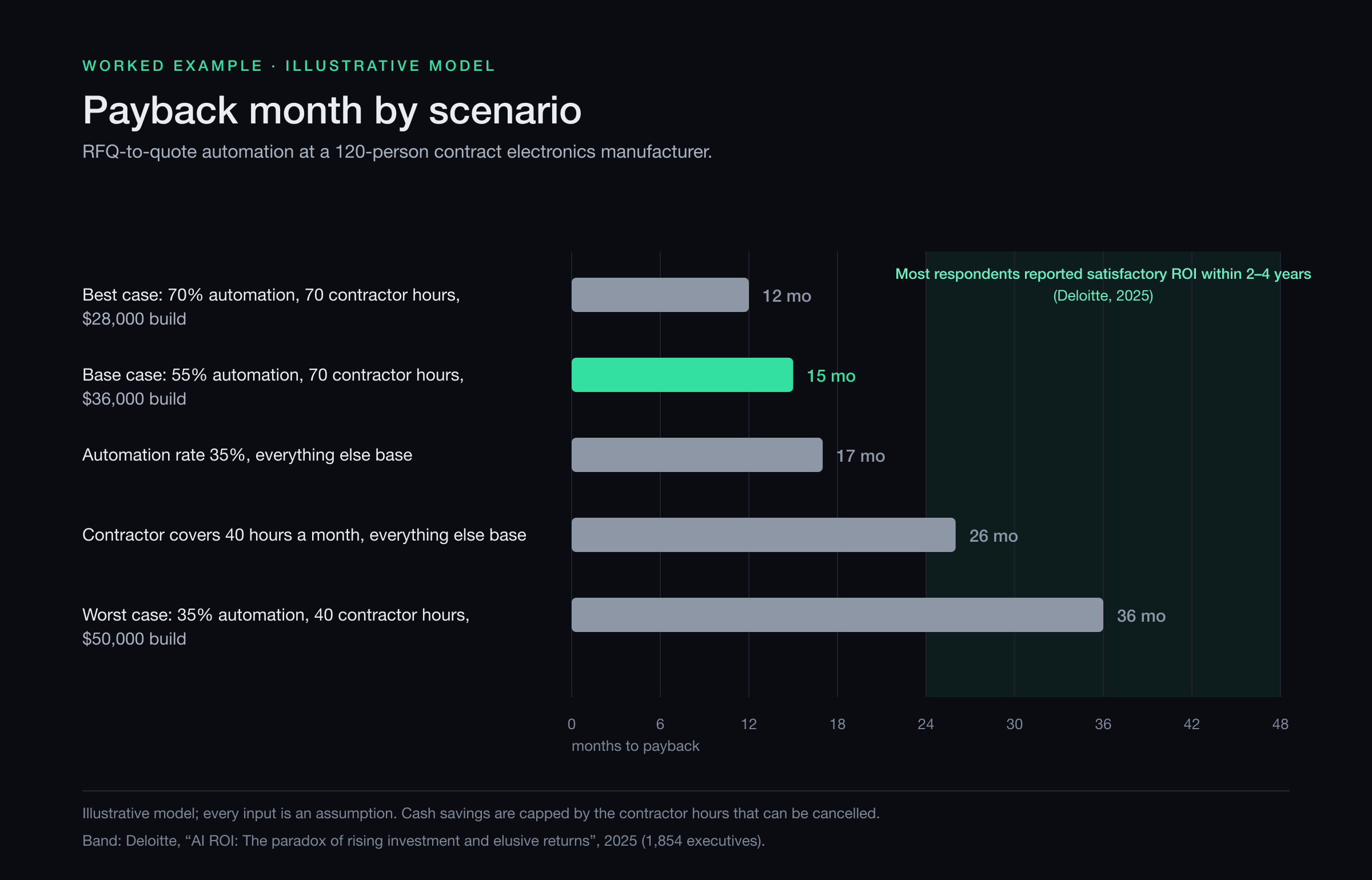
The chart below looks ahead to the section 4 model. It shows the payback month in five scenarios against months 24 to 48, the range in which most of Deloitte’s respondents reported satisfactory ROI. The two scenarios that fall inside that range are the ones where the cancellable contractor invoice is small, not the ones with a low automation rate. A model that beats reported experience by a wide margin needs its inputs tested first.
4. Deep-Dive: SME Financial Model
Many finance leaders run small and mid-sized enterprises (SMEs) of 20 to 500 employees, where capital is scarce and risk tolerance modest.
Example (illustrative): a 120-person contract electronics manufacturer turns customer requests for quotation (RFQs) into quotes. One in-house estimator carries most of the work alongside other sales-engineering duties, and the overflow goes to an outside estimator who bills by the hour. The planned tool reads each RFQ and its bill of materials (BOM), matches part numbers, pulls supplier prices and drafts the quote; an estimator checks and sends it. Every input is an assumption, so replace each one with your own.
| Input | Assumption |
|---|---|
| RFQs per month | 50 |
| Estimator time per RFQ | 3.5 hours |
| Quotes revised for errors after sending | 5%, at 1.5 hours each |
| Baseline estimating work | 178.75 hours a month, 2,145 a year |
| Worked by the outside estimator | 70 hours a month, 840 a year |
| Worked in house | 108.75 hours a month |
| Outside estimator’s rate | $65.00 an hour, invoiced monthly for hours worked, no minimum commitment |
| In-house loaded hourly cost | $30.00 × 1.496 = $44.88 (values capacity; not a cash saving here) |
| One-time cost, paid over months 1-3 | $36,000: $24,000 build, $9,000 integration and data cleanup, $3,000 training |
| Running cost from go-live in month 4 | $1,000 a month: software, usage, maintenance, monitoring |
| Automation rate at steady state | 55% of baseline hours |
| Ramp-up, months 4-6 | Half the steady-state hours removed |
| How the hours turn into cash | The contractor’s hours are cut first, and the invoice falls in the month the hours fall. In-house hours freed are capacity: the estimator’s salary does not change. |
That last row is the whole model. The contractor bills $4,550 a month, $54,600 a year, and that invoice is the only line this project can shrink. At 55% automation the tool removes 98.3 hours a month, more than the 70 the contractor works, so the saving stops at the contractor’s hours: $4,550 a month. Above about 39% automation, every further hour removed is capacity for the in-house estimator, worth $44.88 an hour in work she can now take on, but it is not money leaving the accounts.
During ramp-up the arithmetic is different: half of 98.3 is 49.2 hours, below the contractor’s 70, so months 4 to 6 save 49.2 × $65 = $3,195 a month.
| USD | Saved | One-time costs | Running costs | Total costs | Net position | ROI |
|---|---|---|---|---|---|---|
| Year 1 | 36,885 | 36,000 | 9,000 | 45,000 | −8,115 | −18% |
| Years 1–3 | 146,085 | 36,000 | 33,000 | 69,000 | +77,085 | 112% |
- Year-one savings = 3 months of ramp-up at $3,195 ($9,585) plus 6 months at $4,550 ($27,300)
- Year-one ROI = ($36,885 − $45,000) ÷ $45,000 = −18%
- Three-year ROI = ($146,085 − $69,000) ÷ $69,000 = 112%
- Payback = month 15: the cumulative position is −$1,015 at the end of month 14 and +$2,535 at the end of month 15
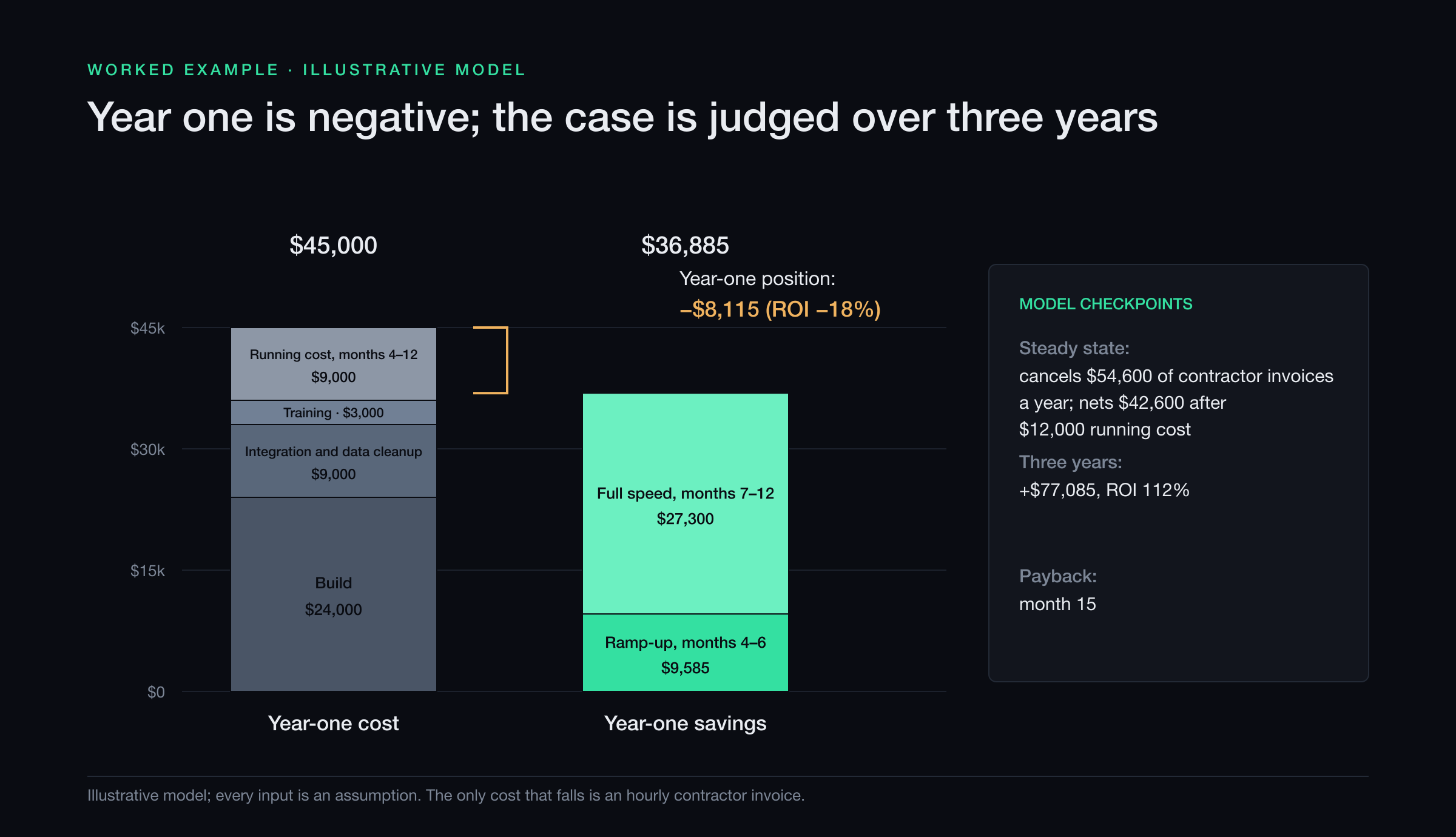
A negative first year is normal here: the build is paid before the first saving arrives, and savings ramp up while people learn the tool. Judge the project at the end of its horizon, not during the build and ramp-up months, when it looks worst.
The sensitivity tests say something a vendor’s slide rarely does. Raising the automation rate from 55% to 70%, with everything else at base, moves payback from month 15 to month 14, because at steady state the saving is already capped by the contractor’s hours and only the ramp-up months improve. Cutting the contractor from 70 hours a month to 40, with everything else at base, moves payback from month 15 to month 26. A $50,000 build moves it to month 19.
So the load-bearing input is not the automation rate. It is the size of the invoice you can stop paying, and your freedom to stop paying it: a retainer with a minimum monthly commitment, or a supplier you need on call for peak weeks, will not shrink the way this model assumes. Establish that first, in writing, then pilot the automation rate on past RFQs before the full build. The model also holds RFQ volume flat and assumes no price rise at renewal and no rebuild within three years.
5. From Pilot to Portfolio: CFO Playbook
5.1 Selecting high-yield candidates
- High volume, rule-based and error-sensitive: sales-order entry and supplier invoice matching. Measure minutes per order or invoice, and the share with price or quantity mismatches.
- Processes holding up revenue: RFQ to quote. Measure hours per quote by step and quotes revised after sending; expect exceptions from messy BOMs, obsolete parts and stale prices.
- Compliance hotspots with audit exposure: generating certificates of conformance, which state that a shipment meets the customer’s requirements, and routing nonconformance reports on parts that do not. Measure shipments held at the dock for paperwork and days from report to decision, and keep a human sign-off on both.
Before any of these reaches the board, name the line in the accounts that will get smaller and check who controls it.
5.2 Funding and governance
- Capex vs opex. Subscription and usage fees are commonly booked as operating expense (opex), while part of a custom build may qualify as capital expenditure (capex) and be amortized. Which applies depends on your accounting policy, so settle it with your auditors before the board sees the case.
- Gate model. Fund in stages. Release the full build only after a pilot has measured the automation rate, and require a plan for the freed hours before scale-up: which invoice falls, or which work the freed capacity absorbs. An outside ROI review can put the assumptions in writing before a gate, with a recommended next step but no guaranteed return.
- Automation dividend. Decide in advance what share of measured savings funds the next automation, and release it only when the savings show in the accounts.
5.3 Risk mitigation
| Risk | CFO Control Lever |
|---|---|
| Automation rate below plan | Pilot on past cases; fund the build on the measured rate |
| The cost you planned to remove does not fall | Check notice periods and minimum commitments in supplier contracts before the business case; book the saving only when the invoice drops |
| Build cost overrun | Fixed-scope milestones with acceptance criteria agreed in advance |
| Inflationary software renewals | Multi-year price caps; renewal increases modeled in the running-cost line |
| Change fatigue among staff | Involve the team that does the work in the time study and pilot; share part of the gains |
| Errors in automated output | Human review before anything leaves the company; weekly checks of the exception log |
| Cyber and data breach | Vendors with a SOC 2 Type II report, an independent audit of their security controls over time; segregation of duties, so no one person both builds and approves a flow |
6. Measuring Intangibles
Cash metrics should decide the case. Intangibles still belong in the approval memo, but as a list with a metric for each:
- Staff retention: voluntary turnover, and employee net promoter score (eNPS), a survey of whether staff would recommend the company as an employer.
- Customer response: quote turnaround in days, and the win rate on quotes sent.
- Audit readiness: preparation hours and findings per audit, which convert to avoided overtime or consulting fees once measured.
- Capacity: in-house hours freed, valued at the loaded rate. This is a real gain and the right place to record it, but it is not cash until the capacity absorbs work you would otherwise have paid for.
Keep these out of the ROI until they are measured. If one holds up over a couple of quarters, move it into the model at the measured value. A project that pays back only when intangibles count is a weak case.
7. Strategic Outlook
- Gains concentrate where experience is thin. The support-agent study in section 1.2 found the clearest improvement among less experienced workers.3 Target desks with high turnover or a long learning curve, and do not apply an average gain to a team of veterans.
- More AI projects are being abandoned. S&P Global Market Intelligence surveyed more than 1,000 respondents in North America and Europe in 2025. As CIO Dive reported, the share of companies abandoning most of their AI initiatives rose to 42%, from 17% a year earlier.6 Staged funding (section 5.2) limits what a dropped project costs.
- Composable platforms. Low-code tools, which build automations from visual blocks instead of code, let finance teams create simple flows under IT governance. Each flow still needs an owner, monitoring and a line in the running-cost budget.
Conclusion
For finance leaders, “true ROI” means cash gains you can verify in the accounts, over a horizon stated in advance, with every assumption on the page. Use the correct formula, carry new revenue at its contribution after cost, model the build and ramp-up months, and name the invoice that will fall before you fund the build. Such a case will often show a slower payback than a vendor’s slide, but it is one you can still defend when year one’s results come in.
Footnotes
-
Deloitte, “AI ROI: The paradox of rising investment and elusive returns” (survey of 1,854 executives in 14 countries across Europe and the Middle East, fielded 15 August to 5 September 2025), 2025. https://www.deloitte.com/global/en/issues/generative-ai/ai-roi-the-paradox-of-rising-investment-and-elusive-returns.html ↩ ↩2 ↩3
-
U.S. Bureau of Labor Statistics, “Employer Costs for Employee Compensation – June 2026”, Table 4: Private industry workers by occupational and industry group (released September 9, 2026), 2026. https://www.bls.gov/news.release/ecec.t04.htm ↩ ↩2
-
Erik Brynjolfsson, Danielle Li and Lindsey Raymond, “Generative AI at Work”, arXiv:2304.11771, version 2, 2024. https://arxiv.org/abs/2304.11771 ↩ ↩2 ↩3
-
Ardent Partners (Andrew Bartolini), “State of ePayables (Part Nine): AP Benchmarks and Best-in-Class Performance”, from The State of ePayables 2025: AP’s Unfinished Journey, published January 22, 2026. https://payablesplace.ardentpartners.com/2026/01/state-of-epayables-part-nine-ap-benchmarks-and-best-in-class-performance/ ↩
-
Raymond R. Panko, “What We Don’t Know About Spreadsheet Errors Today: The Facts, Why We Don’t Believe Them, and What We Need to Do”, EuSpRIG 2015 Conference Proceedings, arXiv:1602.02601, 2016. https://arxiv.org/abs/1602.02601 ↩
-
CIO Dive (Lindsey Wilkinson), “AI project failure rates are on the rise: report”, on a survey by S&P Global Market Intelligence, March 14, 2025. https://www.ciodive.com/news/AI-project-fail-data-SPGlobal/742590/ ↩